Redesigning a website is one thing.
Redesigning a website and migrating it to a new platform without creating an SEO disaster is another.
I led a website redesign and migration project for a marketing agency that involved a complete visual redesign, new site architecture, content updates, development, URL changes, and a move to HubSpot.
The goal wasn't simply to make the website look better. The existing site had become difficult to navigate, its architecture lacked a clear hierarchy, and the design no longer reflected the company's brand.
We needed a website that looked like the company it had become—not the company it had been several years earlier.
And we needed to get there without losing the search visibility the existing site had already earned.
The Challenge: An Outdated Website With a Messy Foundation
The existing website had several problems.
The visual design was dated. Navigation lacked a clear hierarchy. There weren't consistent parent and child page relationships, and the overall structure made it difficult for users to find what they needed.
From an SEO perspective, there was plenty to clean up, too.
The site had issues including:
- Slow page performance
- Orphaned pages
- Long and inconsistent URL structures
- Multiple H1 tags in some templates
- Limited use of semantic HTML
- Missing or weak anchor text
- Technical and on-page SEO inconsistencies
At the same time, the business wanted the new website to do more than look good. It needed to create a better user experience and support lead generation.
So I approached the project as both a website redesign and an SEO-conscious migration.
Planning the Website Migration
Before touching the design, I needed to understand what we were working with.
I collaborated with the CEO and a writer to map out the site's new architecture. We reviewed the existing pages, determined what should stay, identified content that could be removed, and established a clearer navigation hierarchy.
I also created a URL mapping document that connected the old URLs to their corresponding new locations.
This became particularly important later when it was time to implement redirects.
A website migration is not the ideal moment to discover that nobody knows where 82 pages went.
Website Design: From Wireframes to Final Layouts
Once the architecture was established, I moved into the design phase.
I started with sketches and wireframes to work through the page layouts and overall structure before getting too attached to pixels.
Once the wireframes were approved, I moved into development.
The design process focused on creating a cleaner, more modern visual system while staying true to the company's brand.
The goal wasn't to redesign the site simply for the sake of making it look different.
It needed to be easier to navigate, easier to understand, and more effective at guiding users toward the information and services they were looking for.
Web Development: Building the Site in Webflow and HubSpot
The development process happened in two stages.
Webflow Development
I initially built the approved designs in Webflow, using an existing template as a starting point to speed up development.
I customized the template extensively to match the brand and approved wireframes.
Once the designs and front-end development were complete, I exported the files and moved them into HubSpot.
HubSpot Development
The second phase involved rebuilding the site within HubSpot's Design Manager.
I created custom modules using the exported code, HubL, HTML, and CSS.
In total, I created 20 custom templates for the new site.
This gave the team a more flexible system for building and managing pages going forward rather than forcing every new page into the same rigid structure.
Building and Configuring 82 Pages
With the templates in place, I moved into the less glamorous—and considerably more repetitive—part of the project.
I created and configured approximately 82 individual pages in HubSpot.
These included:
- Homepage
- Service pages
- About pages
- Team member pages
- Landing pages
- Blog content
- Supporting website pages
Each page required its own content, imagery, metadata, URLs, and SEO configuration.
I also applied on-page SEO best practices throughout the site, including metadata, heading structure, image alt text, keyword targeting, and page-specific optimization.
It was a lot of pages.
And yes, at this stage of a website project, you begin to develop a slightly unreasonable relationship with spreadsheets.
SEO Strategy: Building the New Site Without Losing Search Visibility
SEO was part of the project from the beginning rather than something I planned to bolt onto the website five minutes before launch.
I conducted keyword research for high-value pages, particularly service pages, and used those insights to inform content and page optimization.
I also addressed technical SEO issues while developing the new templates, including:
- Page loading speed
- Semantic HTML
- Anchor text
- Orphaned pages
- URL structure
- Heading hierarchy
- Image optimization
- Lazy loading
I followed a comprehensive on-page SEO checklist for each page, covering metadata, alt text, keyword placement, headings, and other page-level elements.
The idea was simple:
Build the SEO into the website instead of trying to fix it afterward.
URL Mapping and 301 Redirects
The biggest SEO concern during the migration was the URL changes.
Changing URLs can mean changing the address of pages that have already accumulated search visibility and authority. Handle that poorly, and you can make a beautiful new website that nobody can find.
Not exactly the desired outcome.
Using the URL mapping document I created during the planning stage, I implemented 301 redirects for pages that moved to new URLs.
I also preserved existing blog post URLs where possible to minimize unnecessary disruption to content that was already performing well.
Before launch, I manually tested the new pages, checked redirects, reviewed content, and tested the site across devices and browsers.
Then we launched.
Testing, Launch, and the Inevitable Post-Launch Cleanup
I wish I could tell you that the website launched perfectly and everyone went home.
It didn't.
That's not how websites work.
After launch, I continued monitoring the site for broken links, missing content, design inconsistencies, performance issues, and SEO problems that surfaced once the new site was live.
I also conducted additional page-speed testing and SEO audits to identify opportunities for improvement.
The goal was to catch problems quickly rather than assume everything was fine because the website technically existed.
The Biggest Challenge: Doing It Without Cutting Corners
The project had a small team, limited resources, competing priorities, and a lot of moving pieces.
I was balancing the migration alongside other projects, which meant there was plenty of temptation to rush through certain steps.
I didn't.
Website migrations are one of those projects where skipping a five-minute check can create a five-hour problem later.
So I stuck to the project plan, worked through the pages methodically, and prioritized testing and SEO throughout the process.
It took longer.
It was also worth it.
The Results: A Better Website Without an SEO Freefall
The new website delivered the improvements we were looking for:
- A modernized visual design
- Clearer site architecture
- Improved navigation
- More consistent page experiences
- Better mobile and browser performance
- Improved technical SEO
- A more flexible HubSpot template system
But the most important question was what happened to organic search performance.
Organic Traffic Held Up During the Migration
A temporary fluctuation in organic traffic was expected as the new URLs were indexed and the site settled into its new structure.
Instead, the decline was relatively minimal.
Organic traffic ultimately increased after launch, with the strongest growth coming from existing blog content.
Newer pages and relocated content went through a transitional period before normalizing toward the end of Q1 2023.
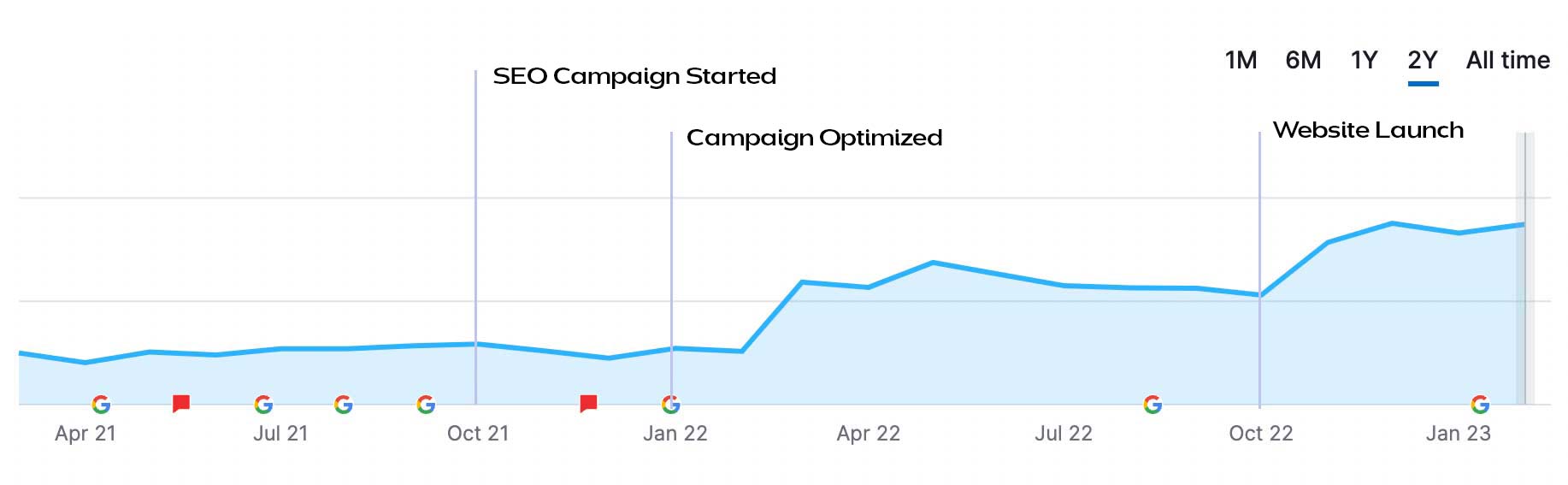
That was a particularly encouraging result because the project involved significant structural and URL changes.
The goal wasn't to preserve every single metric exactly as it was before the migration.
The goal was to move the website forward without sacrificing the search visibility it had already earned.
And we did.
What I Learned From the Migration
The biggest lesson from this project was that a website redesign and an SEO strategy shouldn't exist in separate rooms.
Design decisions affect SEO.
Architecture affects SEO.
Content affects SEO.
URLs affect SEO.
Development affects SEO.
Even the seemingly boring stuff—like how your headings are structured or whether a page has an orphaned URL—can become part of the larger picture.
The best time to think about SEO during a website redesign isn't after the designs are approved.
It's before you start designing.
A successful migration isn't just about launching a better-looking website.
It's about building a better website without throwing away everything the old one had already earned.
And, frankly, that's a much more interesting problem to solve.
Client Feedback
“You did a fantastic job, Genesis! We love the new site!”
CEO
“Great job, Genesis! You captured the essence of our company!”
VP of Business Development
“Love working with you Genesis Aguilar—you did an amazing job bringing our vision to life!”
Team Member